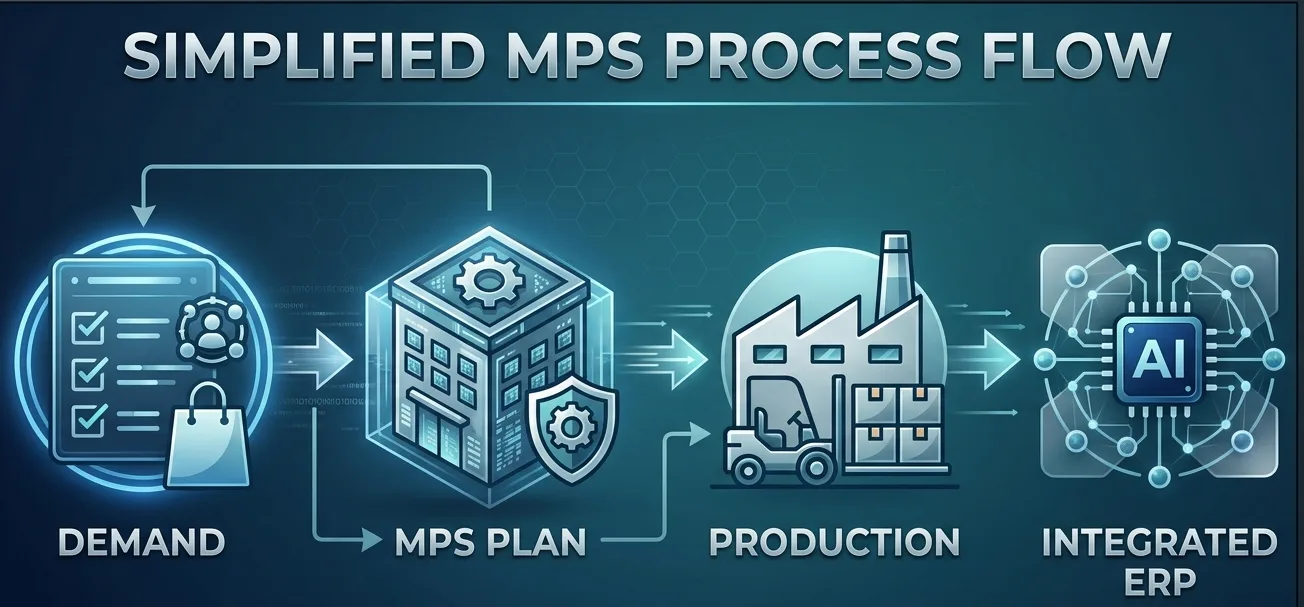
What Is a Master Production Schedule (MPS)?
A Master Production Schedule (MPS) is a detailed plan that specifies what finished products to build, in what quantities, and when. Think of it as the definitive, realistic game plan for your manufacturing operations over a specific planning horizon, which can range from a few months to over a year.
It's the critical link between sales forecasting and actual production. While a forecast estimates what you might sell, the MPS is a firm commitment to what you will build. This schedule becomes the primary driver for all subsequent planning activities, most notably Material Requirements Planning (MRP), which calculates the raw materials and components needed to execute the plan. The MPS acts as a contract between your sales and production departments, ensuring that sales teams make promises that the shop floor can actually keep.
MPS vs. Demand Forecast vs. MRP: Understanding the Difference
It's easy to confuse these three core planning concepts, but they serve distinct and sequential purposes. Getting the relationship right is fundamental to an efficient production cycle.
Demand Forecast
The demand forecast is a prediction of future sales based on historical data, market trends, and sales team input. It answers the question: “What do we expect customers to buy?” It is an unconstrained view of potential demand and serves as a major input to the MPS, but it is not the production plan itself.
Master Production Schedule (MPS)
The MPS takes the demand forecast, adds firm customer orders, and balances them against your actual production capacity (machines, labor, etc.). It answers the question: “Given our demand and our constraints, what will we actually produce?” The MPS is a capacity-constrained plan for specific end products, making it a realistic and actionable schedule.
Material Requirements Planning (MRP)
Once the MPS is set, the MRP system takes over. It explodes the MPS through the Bill of Materials (BOM) for each finished product to determine the exact quantity and timing for all necessary raw materials, subassemblies, and components. MRP answers the question: “What do we need to buy and make to fulfill the Master Production Schedule?”
In short, the forecast informs the MPS, and the MPS drives the MRP. This logical flow turns a high-level sales prediction into detailed purchasing and shop floor orders.
Key Inputs for an Accurate Master Production Schedule
An effective MPS is not created in a vacuum. Its accuracy depends on the quality and timeliness of several key data inputs. Trying to manage this with spreadsheets is a recipe for errors, as the data is constantly changing.
Key inputs include:
- Demand Forecast: The starting point for understanding future requirements.
- Firm Customer Orders: Existing sales orders that must be fulfilled, which consume the forecast.
- Starting Inventory Levels: The quantity of finished goods you already have on hand.
- Production Capacity: A realistic understanding of your constraints, including machine hours, labor availability, and facility limitations.
- Supplier Lead Times: How long it takes to procure necessary raw materials.
- Lot Sizing Rules: Minimum, maximum, or incremental order quantities for production runs.
How an ERP System Transforms MPS and Production Planning
A Master Production Schedule is a dynamic tool; it needs to adapt to changes in demand and capacity. This is where a modern cloud ERP system becomes indispensable, moving manufacturers from fragile, disconnected spreadsheets to a single, integrated planning environment.
From Static Spreadsheets to a Dynamic Plan
Spreadsheets can quickly become outdated and are prone to errors. An ERP system centralizes all the necessary inputs for the MPS—sales orders, inventory levels, BOMs, and capacity data—into a single source of truth. This ensures that when a planner generates or adjusts the schedule, they are working with the most current information available.
Real-Time Data Integration
A modern ERP connects planning with execution. As new sales orders are entered, inventory is consumed, or production jobs are completed on the shop floor, the data available for the MPS is updated in real-time. This allows planners to see the immediate impact of a new multi-channel order on the production plan and make adjustments proactively, not reactively.
Capacity-Aware Planning
One of the biggest failures of manual MPS planning is creating a schedule that the shop floor can't actually handle. An ERP system allows for Rough-Cut Capacity Planning (RCCP), which checks the proposed MPS against critical resource constraints. This ensures the plan is feasible before it's released, preventing bottlenecks, costly overtime, and missed deadlines down the line..
Automated MRP Generation
With a validated MPS in place, the ERP system can automatically run the MRP process. It calculates all dependent demand for raw materials and components, generating suggested purchase orders and work orders with the correct timing to support the master schedule. This automation eliminates hours of manual calculations and drastically reduces the risk of material shortages or excess inventory.
By leveraging an integrated ERP, your Master Production Schedule becomes more than just a static document—it becomes the dynamic, data-driven core of a highly efficient manufacturing operation, helping you reduce costs, improve on-time delivery, and increase profitability.
Ready to transform your production planning from a manual chore into a strategic advantage? Explore our resources at the ianaiERP User Guide or contact us to see how an AI-native ERP can bring your MPS to life.