Customer story
Kumkang Firedoor
Kumkang builds doors to individual customer specifications. It uses ianaiERP to connect changing bills of materials and custom orders to the production schedule.
Read the Kumkang Firedoor storySAP Business One alternative for manufacturers
Trace the short part to blocked work orders, customer due dates and revenue at risk. See what to prioritize before your team commits to a new ship date.
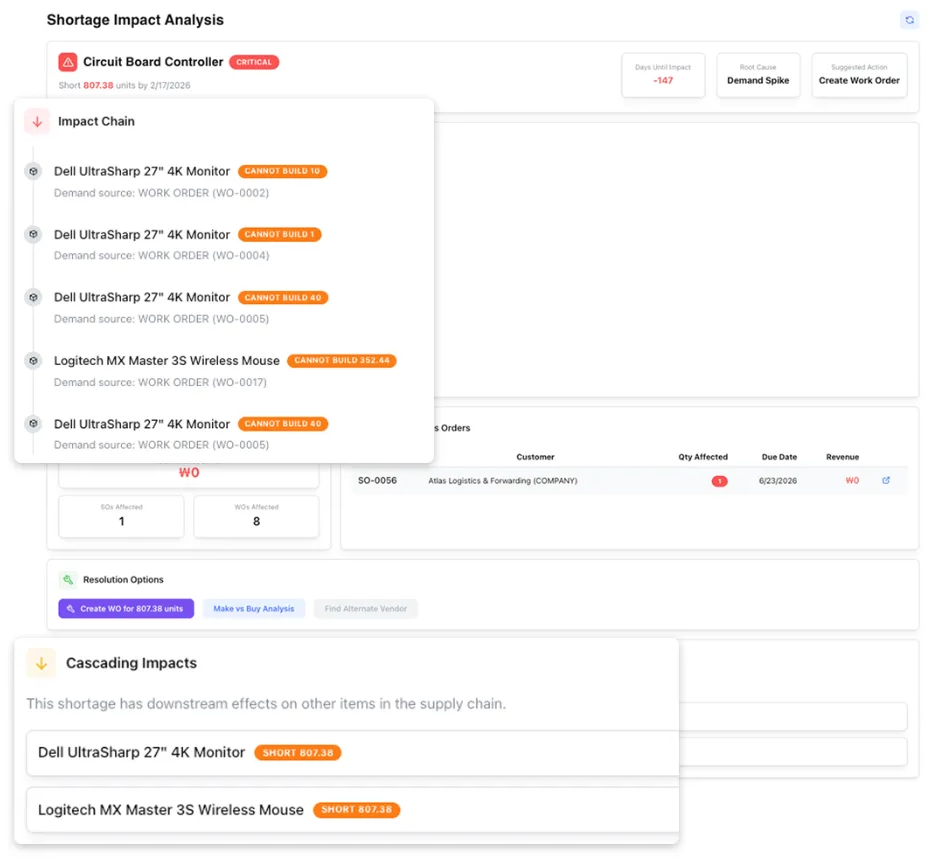 Explore the shortage impact view
Customer story
Kumkang builds doors to individual customer specifications. It uses ianaiERP to connect changing bills of materials and custom orders to the production schedule.
Read the Kumkang Firedoor storyMoving from Business One
Start with a representative production line or warehouse. Check item masters, bills of materials, open orders and inventory balances. Review the reports, local requirements and partner add-ons your team uses.
See the implementation processBring a component shortage or a production order you’ve had to reschedule. We’ll use it to guide a 30-minute workflow demo.
See which system connects material shortages to customer due dates and revenue at risk.
| What to compare | ianaiERP | SAP Business One |
|---|---|---|
| Customer order and revenue impact by shortage | YesAffected orders, due dates and revenue | ConfirmMRP order recommendations |
| Finite-capacity production scheduling | YesWork-center capacity and dependent operations | ConfirmCheck the proposed setup |
| Lot and serial tracking | YesBuilt-in inventory and warehouse tracking | YesBin, batch and serial management |
| Actual production costing | YesMaterial, labor and operation costs by job | YesCosts by production order |
| Visual workflow builder | YesApproval steps and handoffs | ConfirmSDK and partner add-ons |
Confirm your edition, region, add-ons and partner scope before comparing proposals.
Reviewed November 27, 2026. This comparison uses vendor documentation. Confirm editions, modules and implementation scope with each vendor.
SAP Business One 10.0 provides accounting, inventory, production and material requirements planning. ianaiERP connects those functions with shop-floor and warehouse execution. Evaluate the production depth, local requirements and add-ons your teams rely on.
List the partner add-ons, reports, approvals and connected systems that support purchasing, production, warehouse and finance. Identify which workflows must be reproduced before cutover.
Use a sample BOM and production order to verify component issues, receipts and costs. Include lot or serial history and check the postings against finance.
Agree which items, locations, open orders and balances move first. Reconcile imports and keep a record of exceptions before switching the team over.
Use the same users, sites, local requirements and integrations for both quotes. Include training, data migration, support and recurring costs.
Review exports for items, bills of materials, open production orders, stock by location and financial balances. Scope lot history, partial production and historical transactions separately.
List every add-on and report used in the first rollout. Confirm which requirements can be configured and which require an integration or a scoped replacement.
Yes. SAP Business One 10.0 documents an MRP module that evaluates supply and demand and recommends orders. Compare it using your lead times, BOMs and production constraints.
Ask for a quote tied to the same rollout scope, user count, sites, localization, integrations and migration. Compare ongoing support and add-on costs as well as initial services.