Fixing Documents That Need a Person
Most EDI documents go through on their own. When one cannot, it stops as Needs attention with an Error that says why, and its page shows the fix. Nothing is guessed: a document is never posted with the wrong item, address or amount, and nothing is ever posted twice.
Open EDI → Documents, click N needs a person in the header to see only those documents, and open one.
Every reason and its fix
| Error | What happened | What to do |
|---|---|---|
| Unknown item codes | Item numbers on some lines match no item, or more than one. | Fix unknown codes on the document. |
| Unknown unit codes | A line uses a unit code that is not linked to a unit. | Fix unknown codes. |
| Unknown ship-to | The order names a store or distribution center by the partner's number, with no address. | Fix unknown codes: pick the customer address it means. |
| Change to review | The customer's order change (860) contains changes that cannot be applied by themselves. | Review it on the document: Accept or Reject. |
| Invoice to review | A vendor's invoice differs from its purchase order and receipts, or the agreement bills only after review. | Approve and bill or Reject. |
| Remittance to record | A customer's remittance (820) announces a payment. Nothing is posted on a remittance alone. | Record payment or Reject. |
| Validation failed | The document could not be mapped, or the ERP refused it. | Read the message. Fix what it names in the ERP, then Reprocess. If the document itself is wrong, ask the partner to resend it, or Request a mapping change. |
| ERP unavailable | The ERP could not be reached after every retry. | Reprocess. |
| Route stopped | The partner's route was stopped when the document arrived. | Resume the route, then Reprocess. |
| Interrupted while posting | Processing stopped after the ERP was asked to create the record and before its answer was recorded. | Check the ERP for the record first. Reprocess only if it is not there. |
| Stalled | The document was picked up several times and no attempt finished. | Reprocess. |
| Duplicate document | An earlier document with the same business number was posted, is being posted, or may have been. | Nothing, if the partner simply resent it. |
| Delivery failed | The connection could not deliver a document you sent. It is retried by itself for several hours first. | Fix the connection, then Send again. |
| Not confirmed in time | The document left, but the receipt or the partner's 997 did not come in time. A late confirmation still settles it. | Check with the partner before you Send again. |
| Delivery unknown | Whether the document reached the partner is not known. | Check with the partner. Send it again only if they did not get it. |
| Hand-over failed | The document could not be put in line to be sent. It never left. | Send again. |
| Rejected by trading partner | The partner's 997 rejected your document. | Read the 997 on the document's timeline, fix the cause, then send a corrected document. |
| Rejected by the partner's application | The partner's own system rejected your document in an 824. | Open the application advice, fix what it names, and send a corrected document as the partner asks. |
| Shipment not packed | A ship notice waits until the shipment is fully packed in cartons. | Pack the shipment. See Selling to EDI Customers. |
| Line not on the partner's order | A line of the shipment or invoice answers no line of the partner's purchase order. | Fix the shipment or invoice line. |
| Invoice of several orders | The invoice bills more than one of the partner's orders. | Split the invoice, or bill the partner another way. |
| Changed after it was sent | A purchase order was changed after it was sent, and the vendor takes no change orders. | Tell the vendor about the change. |
| Unmatched acknowledgment | An acknowledgment names a document there is no record of sending to this partner. | Usually nothing; check with the partner if it repeats. |
The last four reasons concern documents you send: there is nothing to reprocess. ianaiERP checks again every five minutes and sends the document as soon as the shipment or invoice is ready, so open the record and fix it there.
Fix unknown codes
When an order names an item, unit or store your company has never linked, it stops and asks you which record each code means.
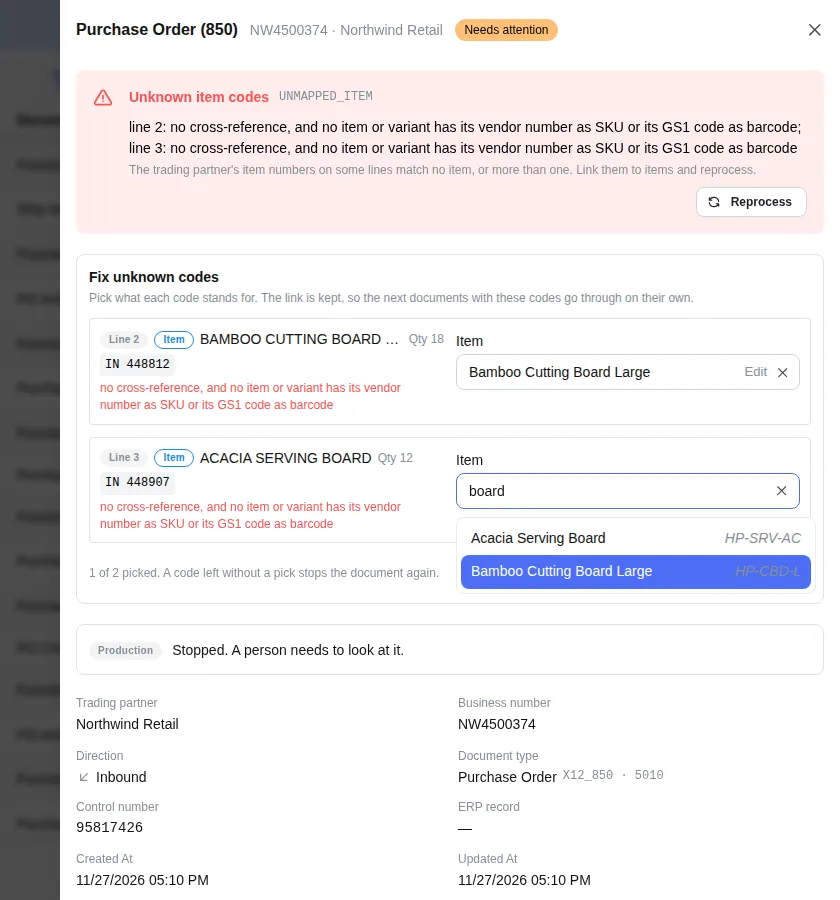 Fix unknown codes on a purchase order with an item picker open
Each stopped line shows its line number, what kind of code it is (Item, Unit or Ship-to), the description and quantity the partner sent, and the codes it carries. For each one, pick the record:
- Item — search by SKU or name.
- Unit — pick a unit. Unit codes are a standard list, so a unit link applies to every trading partner of your company.
- Ship-to — search the customer's addresses by name, street, city or postal code. A store or DC number is that partner's own, so the link applies to that partner only.
Then click Save and reprocess. The links are kept as cross-references, so the next documents with these codes go through on their own, and this document goes back in line within seconds. A code left without a pick stops the document again.
A line that carries no code at all cannot be linked here. Use Request a mapping change so the partner's mapping can be corrected.
You can also add, review and remove links ahead of time on the partner's Cross-references tab. See Cross-References & Field Mapping.
Review an order change (860)
A customer's change to an order applies by itself when the changed lines are unshipped and the change is to a quantity, a date, a price or a cancelled line. Anything else waits for you: an added item, a change to a line already shipped, a whole-order cancellation, or a change the order cannot hold.
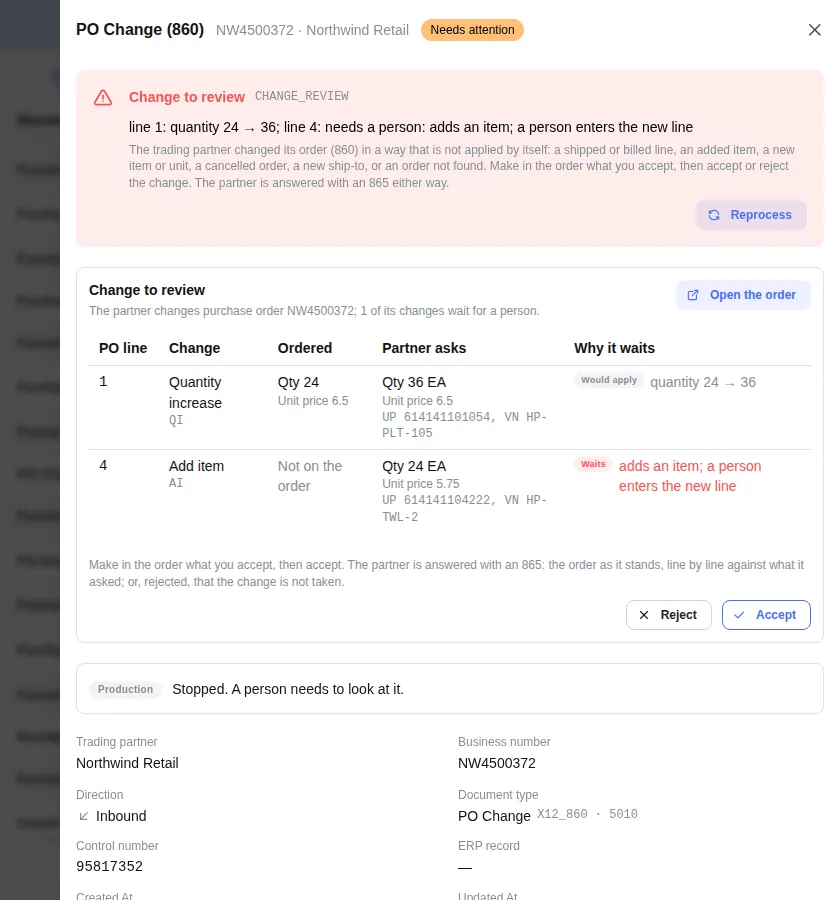 An order change waiting for review, line by line
The section lists each change: the PO line, what the partner asks (Add item, Quantity increase, Reschedule …), what is ordered now, what the partner asks for, and why it waits. Open the order takes you to the sales order.
- Make in the sales order what you accept of the change.
- Come back and click Accept, confirming I have made in the order what I accept of it. Accepting changes nothing in the order by itself: the partner is sent an 865 with the order as it stands now, line by line against what it asked.
Or click Reject, with an optional note. The partner is sent an 865 saying the change is not taken, and the order stays as it is.
Review a vendor invoice (810)
A vendor's invoice becomes a bill by itself when it matches its purchase order and receipts within the agreement's tolerance, and the agreement allows automatic bills. Otherwise it waits as Invoice to review.
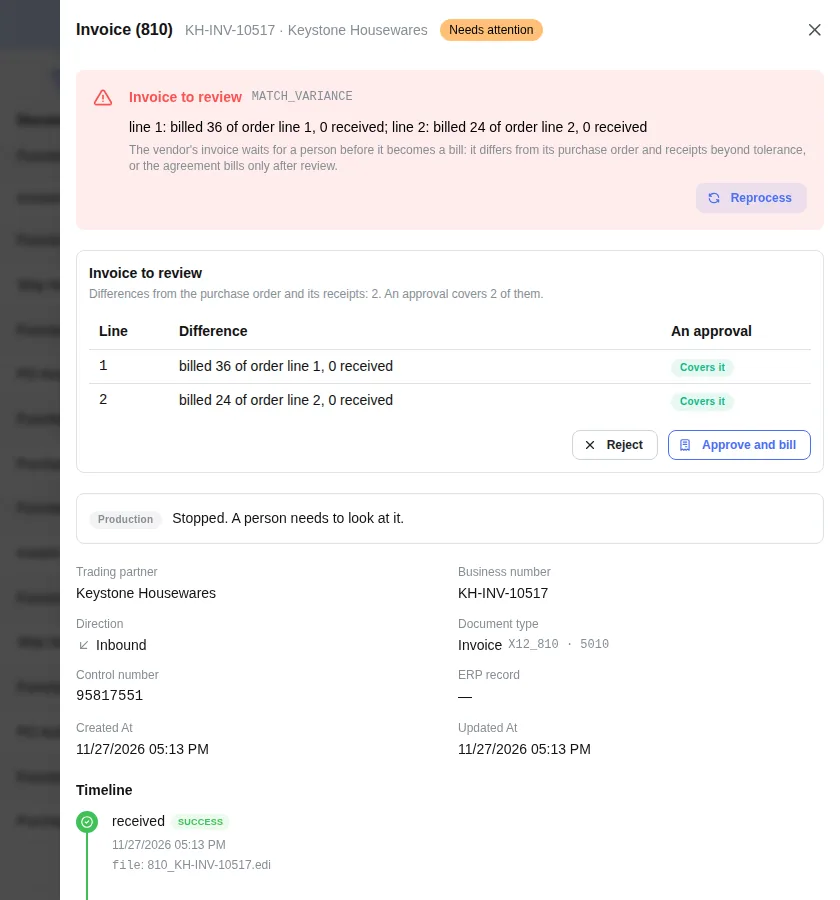 A vendor invoice with its differences from the purchase order
The section lists each difference by line, and whether an approval covers it:
- Approve and bill makes the bill as the invoice stands, accepting its price and quantity differences.
- An approval covers price and quantity differences only. If the section says an approval Does not cover a difference, fix that first (for example receive the missing goods), or enter the bill by hand and reject the invoice.
- Reject closes the invoice with no bill.
Both need EDI write and bill write permission. One vendor invoice can only ever become one bill: a resent invoice with the same number is recognized and not billed again.
Record a customer remittance (820)
A customer's remittance advice tells you what it paid and for which invoices. It is matched against your open invoices and shown on the document; nothing is posted until a person records it.
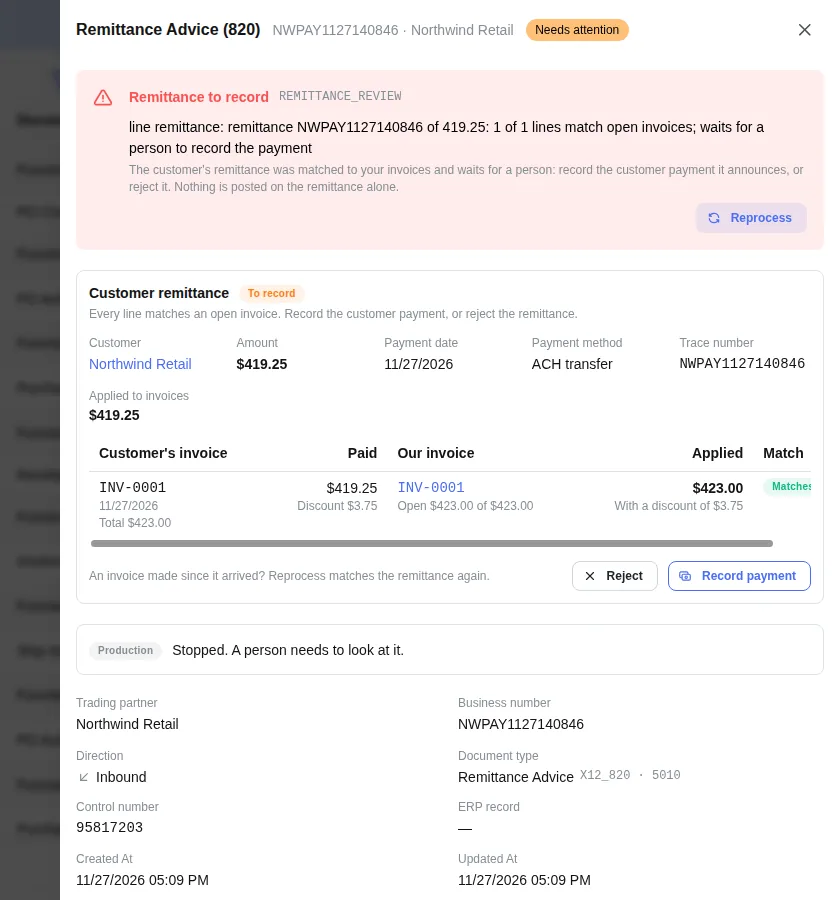 A customer remittance matched to open invoices
The section shows the customer, amount, payment date, method and trace number; what will be applied to invoices; what is left on the payment as credit; and deductions. Each line says whether it Matches, names No such invoice, an Invoice closed, Pays more than is open, or is Not an invoice.
- Record payment records one customer payment and applies it to the matched invoices. Deductions are not posted: each invoice keeps its deducted balance open, for you to settle with the customer.
- Reject closes the remittance with no payment. A reason is required.
- If an invoice was created after the remittance arrived, Reprocess matches it again.
Both need EDI write and payment write permission. A remittance can only ever make one payment.
An administrator can set the 820 agreement to Record fully matched remittances by themselves. Even then, only a remittance where every line matches an open invoice, the lines add up to the payment and nothing is deducted is recorded without you.