Buying from EDI Vendors
With an EDI vendor, you buy exactly as usual. Issuing a purchase order sends it to the vendor's system, and the vendor's answers come back onto your purchase order, receipts and bills.
| When this happens in ianaiERP | The vendor receives or sends |
|---|---|
| You issue a purchase order | 850 purchase order |
| The vendor acknowledges it | 855 → shown on the purchase order |
| You change or cancel an issued order | 860 change order; the vendor answers with an 865 |
| The vendor ships | 856 → an expected receipt you receive from |
| The vendor invoices | 810 → a bill, or an invoice waiting for your review |
| You pay the vendor | 820 remittance advice |
| Every document, both ways | 997 functional acknowledgment |
Issuing a purchase order
A purchase order goes to the vendor when you issue it. Open the purchase order, save it, and click Issue to vendor. It is offered for active orders that are Open, Partial, Overdue or Mixed, and needs purchase order write permission. You can also issue several orders at once from the list.
The order shows Issued with the date and who issued it. If the vendor has a live 850 route, the 850 is sent. Issuing again (Issue again) sends nothing new unless the order changed since it was sent.
On the Purchase Orders list, the Issued to vendor and Vendor answer columns, and the matching filters, show which orders went out and how the vendor answered.
The vendor's acknowledgment (855)
When the vendor acknowledges the order, its answer appears on the purchase order's Vendor acknowledgment card: the answer, when it came, the vendor's reference, and line by line what the vendor acknowledged — quantity, price and promised date — next to what you ordered. Differences are highlighted: Not the quantity ordered, Not the price ordered, Promised after the due date.
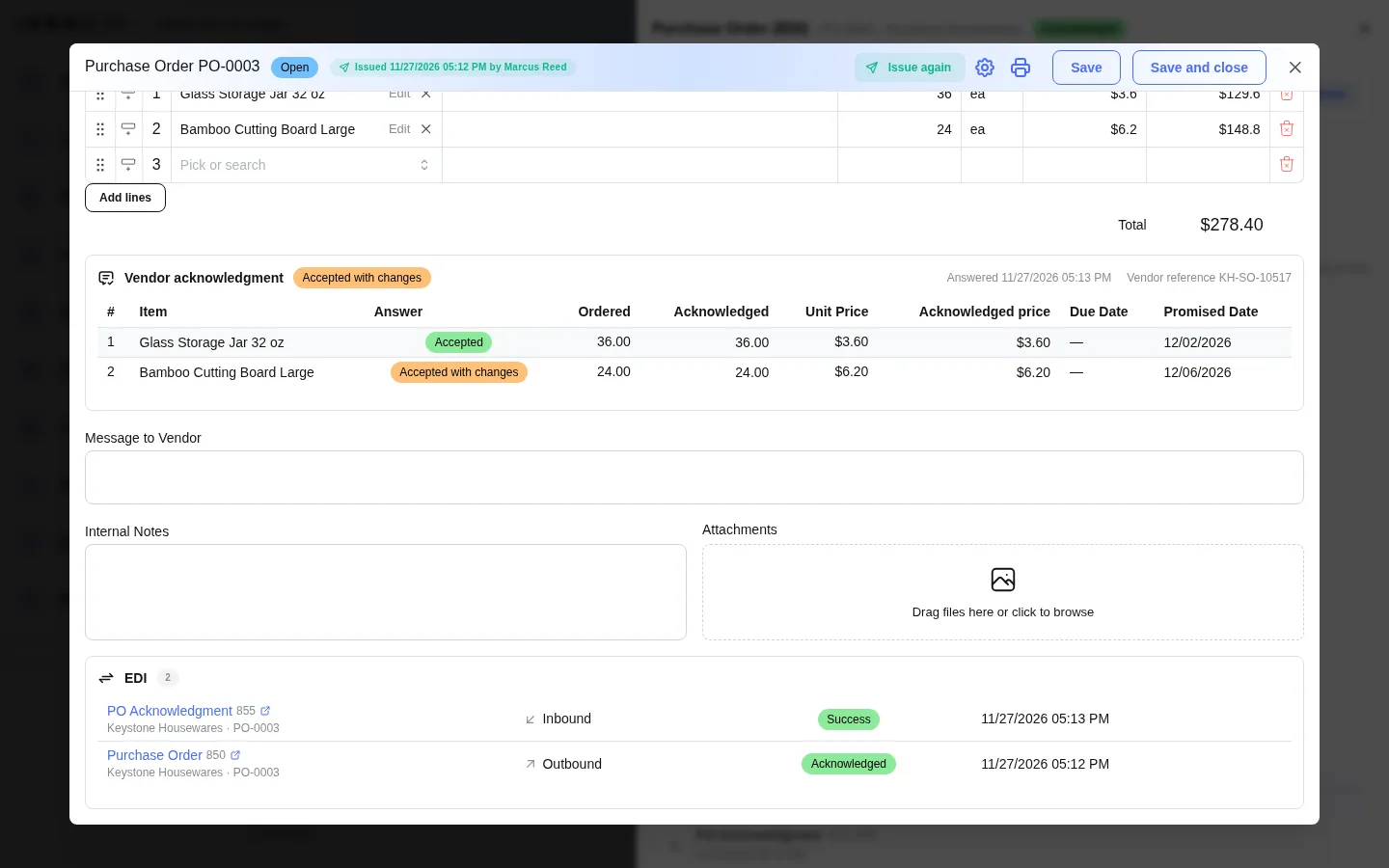 A purchase order with the vendor's acknowledgment
| Vendor answer | Meaning |
|---|---|
| No answer | Nothing received yet. |
| Accepted | Accepted as ordered. |
| Accepted with changes | Accepted, with a different quantity, price or date on some lines. |
| Backordered | Some lines are backordered. |
| Rejected | The vendor rejected the order. |
If the vendor accepts with changes, backorders or rejects the order, the person who created the purchase order is notified.
Changing an issued order (860)
Change the purchase order as usual and issue it again. ianaiERP compares it with what the vendor already has:
- If nothing changed, nothing is sent.
- If it changed and the vendor takes change orders, an 860 is sent. The vendor's 865 answer shows on the order's EDI card: Change accepted, Change rejected, Change accepted with changes or Change accepted, backordered.
- If the vendor takes no change orders, the order is flagged Changed after it was sent — tell the vendor about the change yourself.
Cancelling an issued purchase order sends a cancelling 860, or the same flag.
Ship notices and expected receipts (856)
When the vendor ships, its 856 becomes an expected receipt: what is on its way, in which cartons, with lots, serials and SSCCs. Nothing is received and no stock moves until you receive it.
Open Purchase → Expected Receipts to see them, with the vendor's shipment number, the expected date, and the cartons. You can search by SSCC.
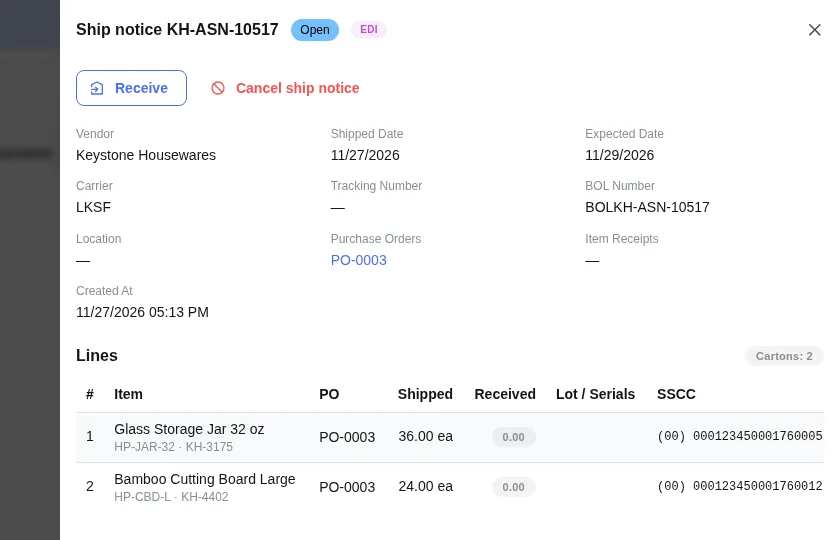 An expected receipt made from the vendor's ship notice
Receiving from a ship notice
- On the web: create a receipt for the purchase order. The alert The vendor sent ship notices for … offers a button per ship notice; click one to fill the receipt's lines, lots and serials from it. Check the quantities and save. The receipt shows Received from ship notice ….
- On the mobile app: open receiving for the purchase order and pick a Receive from ship notice card — or simply scan a carton's SSCC label. Scanning offers Pre-fill carton with that carton's contents; you still scan bins and confirm. Scanning an SSCC from the receiving queue also opens the right purchase order.
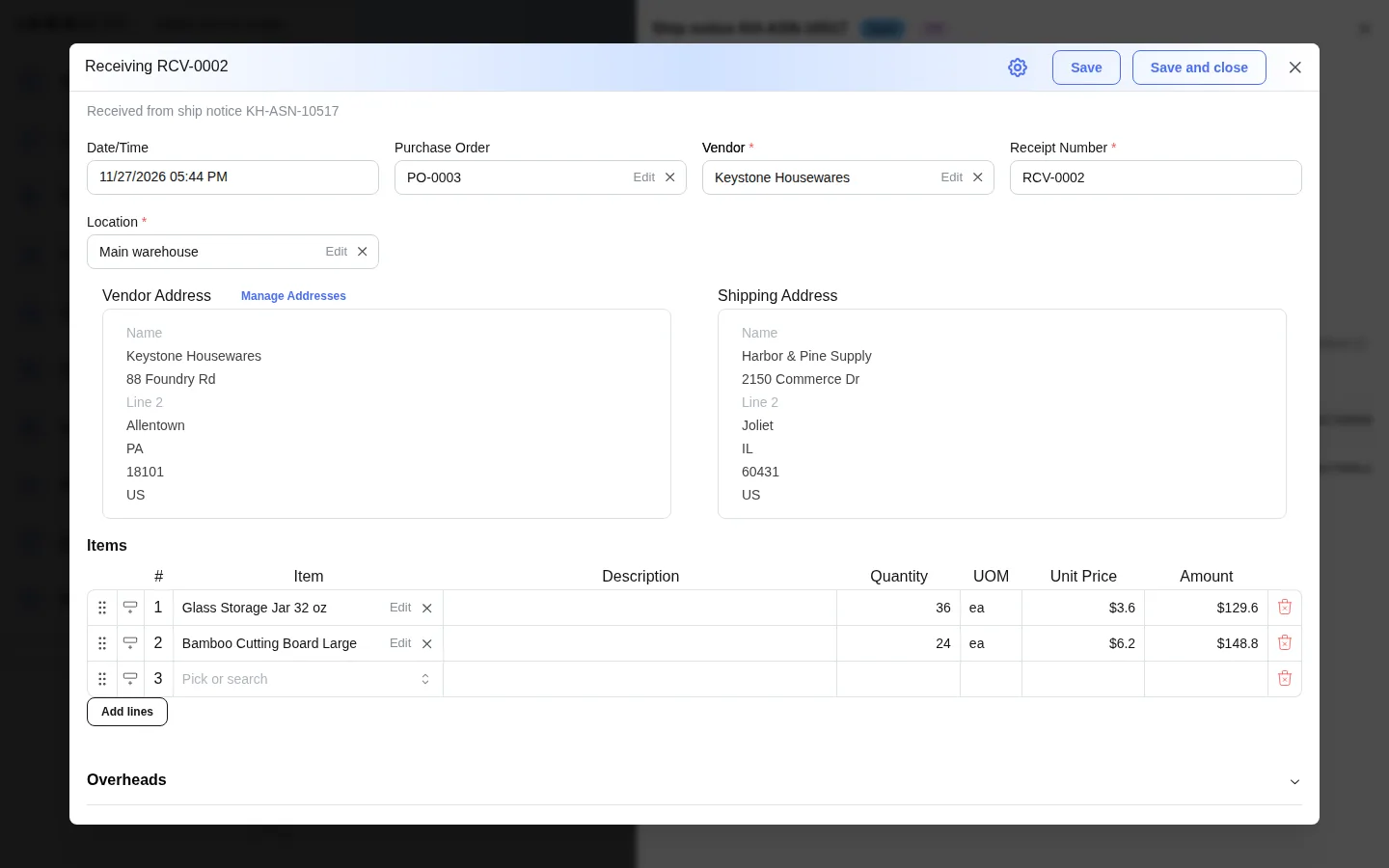 Receiving a purchase order from the vendor's ship notice
Receiving works exactly as a normal receipt from there.
Vendor invoices (810)
The vendor's 810 is matched against its purchase order and what you received.
- When it matches within tolerance and the agreement bills automatically, a bill is created by itself, landing on the receipt's bill where your company creates bills automatically from receipts.
- Otherwise it waits on EDI → Documents as Invoice to review, listing each difference. Approve and bill makes the bill as the invoice stands; Reject closes it with no bill. This needs EDI write and bill write permission. See Review a vendor invoice.
One vendor invoice only ever becomes one bill: if the vendor resends an invoice with the same number, it is recognized and not billed again.
The bill shows an EDI card linking to the vendor's invoice.
Paying the vendor (820)
When you pay an EDI vendor that takes remittance advice, an 820 is sent with each payment, listing the bills it pays. Open it from the payment's EDI card to see Bills paid. A voided payment is not sent again.